Training a Moment Tensor Potential model
In this tutorial, we will see how to train a machine-learning interatomic potential with the MTP model
As for the SNAP example, we need to export the path to the LAMMPS binary with
export ASE_LAMMPSRUN_COMMAND=/path/to/lmp_serial
or directly inside the python script as we will do here
[1]:
import os

os.environ["ASE_LAMMPSRUN_COMMAND"] = "lmp"
Once this is done, we can open the dataset using the io module of ASE
[2]:
from ase.io import read

configurations = read("../Data/Silicon.traj", index=":")
This dataset correspond to 20 configurations of crystaline Silicon in a 2x2x2 supercell with displacements
[3]:
print(configurations[0])
print(len(configurations))
Atoms(symbols='Si64', pbc=True, cell=[10.873553019744607, 10.873553019744607, 10.873553019744607], momenta=..., calculator=SinglePointCalculator(...))
20
For the MTP potential, the descriptor and model are handled directly with the the MLIP package. For this kind of potential, we only need to import the MomentTensorPotential
[4]:
from mlacs.mlip import MomentTensorPotential
To initialize the descriptor, we need to give it some parameters.
[8]:
mtp_params = dict(max_dist=4.5,
                  min_dist=1.5,
                  level=4)
fit_params = dict(max_iter=50,
                  bfgs_conv_tol=1e-3)
We also need to define the path to the mtp binary
[9]:
mlpbin = "mlp"
We can now initalize our model with this descriptor
[11]:
mlip = MomentTensorPotential(configurations[0],
                             mlpbin,
                             mtp_parameters=mtp_params,
                             fit_parameters=fit_params)
We can check the parameters of our MLIP
[12]:
print(repr(mlip))
Moment Tensor Potential
Parameters:
-----------
Descriptor:
-----------
level :                 4
radial basis function : RBChebyshev
Radial basis size :     8
Minimum distance :      1.5
Cutoff :                4.5
To train the model, we need now to add the configurations to the training set.
This is done with the update_matrices function of the potential, that takes either an ASE atoms object or a list of atoms.
[13]:
mlip.update_matrices(configurations)
The model can now be trained using the train_mlip function
[14]:
msg = mlip.train_mlip()
print(msg)
mlp train /home/bejaudr/software/Mlacs/otf_mlacs/tutorials/Mlip/MomentTensorPotential/MTP/initpot.mtp /home/bejaudr/software/Mlacs/otf_mlacs/tutorials/Mlip/MomentTensorPotential/MTP/train.cfg --trained-pot-name=/home/bejaudr/software/Mlacs/otf_mlacs/tutorials/Mlip/MomentTensorPotential/MTP/pot.mtp --update-mindist --init-params=random --max-iter=50 --bfgs-conv-tol=0.001 --scale-by-force=0 --energy-weight=1.0 --force-weight=1.0 --stress-weight=1.0 --weighting=vibrations
---------------------------------------------------------------------------
KeyboardInterrupt                         Traceback (most recent call last)
/tmp/ipykernel_18460/2692604443.py in <module>
----> 1 msg = mlip.train_mlip()
      2 print(msg)

~/software/Mlacs/otf_mlacs/mlacs/mlip/mtp_model.py in train_mlip(self, mlip_subfolder)
    193         self._write_input(subfolder=subfolder)
    194         self._write_mtpfile(subfolder=subfolder)
--> 195         self._run_mlp(subfolder=subfolder)
    196
    197         # Symlink new MTP in the main folder

~/software/Mlacs/otf_mlacs/mlacs/mlip/mtp_model.py in _run_mlp(self, subfolder)
    306                              stderr=PIPE,
    307                              stdout=fd,
--> 308                              cwd=subfolder)
    309         if mlp_handle.returncode != 0:
    310             msg = "mlp stopped with the exit code \n" + \

/usr/lib/python3.7/subprocess.py in run(input, capture_output, timeout, check, *popenargs, **kwargs)
    488     with Popen(*popenargs, **kwargs) as process:
    489         try:
--> 490             stdout, stderr = process.communicate(input, timeout=timeout)
    491         except TimeoutExpired as exc:
    492             process.kill()

/usr/lib/python3.7/subprocess.py in communicate(self, input, timeout)
    952                 self.stdout.close()
    953             elif self.stderr:
--> 954                 stderr = self.stderr.read()
    955                 self.stderr.close()
    956             self.wait()

KeyboardInterrupt:
To check the accuracy of our MLIP, we can use the command line mlacs correlation to plot the correlation between DFT data and MLIP prediction.
[ ]:
%%sh
mlacs correlation MLIP-Energy_comparison.dat --size 10 --datatype energy --save EnergyCorrelation.jpeg --noshow
mlacs correlation MLIP-Forces_comparison.dat --size 10 --datatype forces --save ForcesCorrelation.jpeg --noshow
mlacs correlation MLIP-Stress_comparison.dat --size 10 --datatype stress --save StressCorrelation.jpeg --noshow


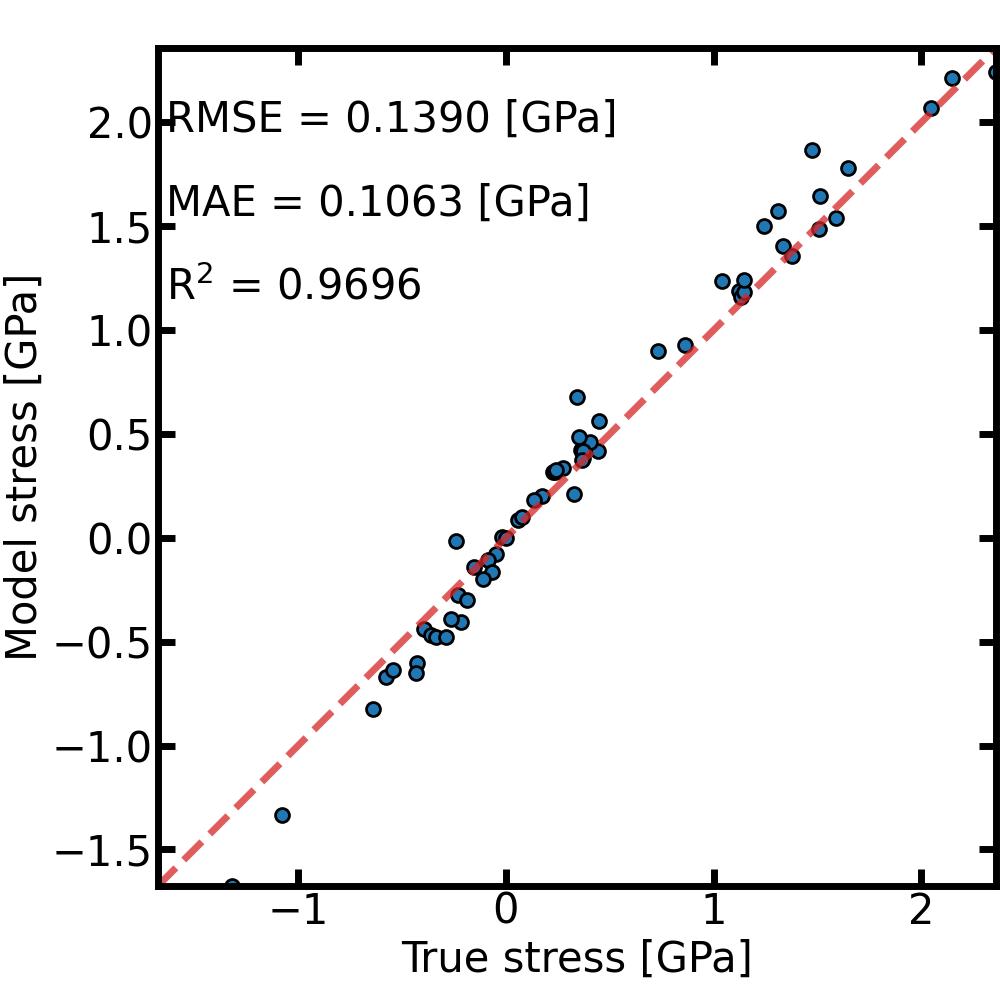
And that’s it ! The model is ready to be used and can be found in the Snap directory. The pair_style and pair_coeff needed to use it in LAMMPS can be obtained from the mlip object
[ ]:
print(mlip.pair_style)
print(mlip.pair_coeff)
Of course, in real applications the parameters and the size of the dataset will need to be different to obtain an accurate model.